Event management software Every feature, on one board
Everything you need to fill seats, from calendars and ticketing to newsletters and analytics.
Forty features. Press one.
Every key is a feature. The seventeen lit ones are what the Free plan gives you. Press any key and one night at The Indigo Room changes.





Start with Tickets
It is off, because a ticket with a price is a Pro feature. Press it and see what the checkout gains.
See how ticketing worksForty keys, five banks
Each key opens the page about that feature. The lit ones are on the Free plan.
Everything lit is on the Free plan: $0, permanently. This board runs on Pro: $5 a month. This board runs on Enterprise: $15 a month.
No platform fee on tickets, whatever is lit. Selfhost it and every Enterprise feature is included.
Take the money
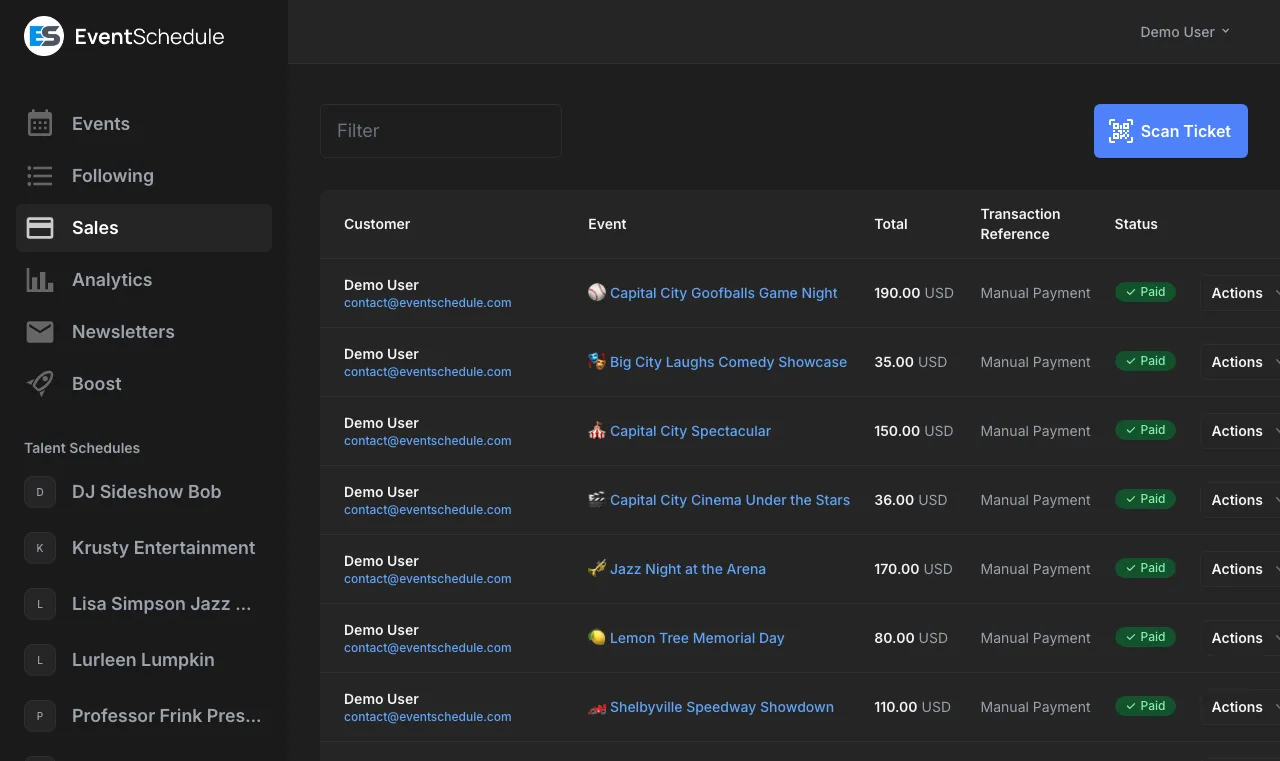
Tickets, passes, gift cards and paid bookings, with zero platform fees and payouts straight to your own Stripe account.
1 of 8 lit on your board

-
Tickets
ProPriced ticket types, paid by Stripe, PayPal, Payfast, Razorpay, an Invoice Ninja invoice, a payment link or cash. The platform fee is zero.
A Stripe, PayPal or Razorpay sale can be refunded in full or in part. -
Free registration
FreeSign-ups with no payment step, a cap per date and a QR code for the door.
-
Promo codes
ProA percentage or a fixed amount off, with a usage limit and an expiry date.
-
Passes
ProOne purchase used across several events: class packs, memberships, season and festival passes.
-
Gift cards
ProSent to someone by email and redeemed toward tickets for any event on your schedule.
-
Installments
ProA buyer splits a ticket over monthly charges, taken off the saved card.
Through Stripe only. -
Waitlist
ProWhen a sold-out event has tickets again, the people waiting are told automatically.
The waitlist for free registration is on every plan. -
Reserved seating
EnterpriseDraw the room once and buyers pick their own seats off the map.
Keep the calendar straight
Two-way sync with the calendar you already live in, repeating events that build themselves, and AI that turns a flyer into a listing.
7 of 8 lit on your board


-
Recurring events
FreeDaily, weekly, every few weeks, monthly or yearly, with single dates added or skipped.
-
Calendar sync
FreeTwo-way sync with Google Calendar, Outlook and any CalDAV server.
-
AI import
FreePaste text, a link or a flyer and the details are read into an event.
Daily limits apply. -
Sub-schedules
FreeSort events by stage, series or room. Each one gets a colour, a visitor filter and its own URL.
-
Online events
FreeTick Online and paste the link people join on: Zoom, YouTube, Teams or your own page.
-
Appointments
FreeBookable appointment types with weekly hours. Guests pick an open time in their own timezone.
One free type on Free. More types and paid bookings are Pro. -
Booking requests
FreePromoters ask to book an act and acts ask a venue for a date, on a form on your schedule page.
-
Availability
EnterpriseEveryone on a talent schedule marks the dates they cannot play, where the whole team can see them.
Works with what you already use
See all integrationsFill the room
Publishing an event already tells the people who subscribed. Newsletters, shareable graphics and Meta ads cover everyone else, without opening a single ad manager.
6 of 8 lit on your board


-
Newsletters
FreeSubscribers get a digest when you publish new events. Write the rest in a drag-and-drop builder.
10 emails a month on Free, 100 on Pro, 1,000 on Enterprise. -
Event graphics
FreeA shareable image and formatted text of your upcoming events, ready for Instagram or WhatsApp.
-
Email sign-up
FreeOne field. A confirmed address gets your new-event digest and an account.
-
Short links
FreeEach schedule link gets a short address like /instagram, with clicks counted.
-
Embed calendar
FreeDrop your schedule into any website with a single iframe. No plugin required.
-
Lineup
FreeEvery act you list shows on the event page, linked where it has a page of its own.
-
Boost ads
ProTurn an event into a live Facebook and Instagram ad. No ad manager required.
-
Embed tickets
ProSell tickets straight from your own site with an embeddable checkout.
Turn a crowd into a following
Fan videos, polls, star ratings and privacy-first analytics, so the people who showed up once have a reason to come back.
3 of 8 lit on your board


-
Check-in
FreeScan the QR code on any ticket at the door with a phone. Each ticket admits once.
The live count of who is in is Pro. -
Fan videos
FreeFans add YouTube videos, photos and comments. Everything waits in an approval queue.
25 fan photos on Free, no cap on Pro. -
Analytics
FreeWeb traffic, revenue and check-ins, with no third-party tracker involved.
-
Polls
ProAdd a poll to any event. Signed-in guests pick one choice and see the result at once.
-
Feedback
ProAttendees are emailed after the event for a star rating and a comment.
-
Carpool
ProAttendees offer and claim rides to your event, with driver approval and reviews.
-
Photo gallery
ProYour own photos on an event page, with captions, credits and a full-screen view.
-
Sponsor logos
ProA tiered logo wall on your schedule page, for the people funding it.
Make it yours
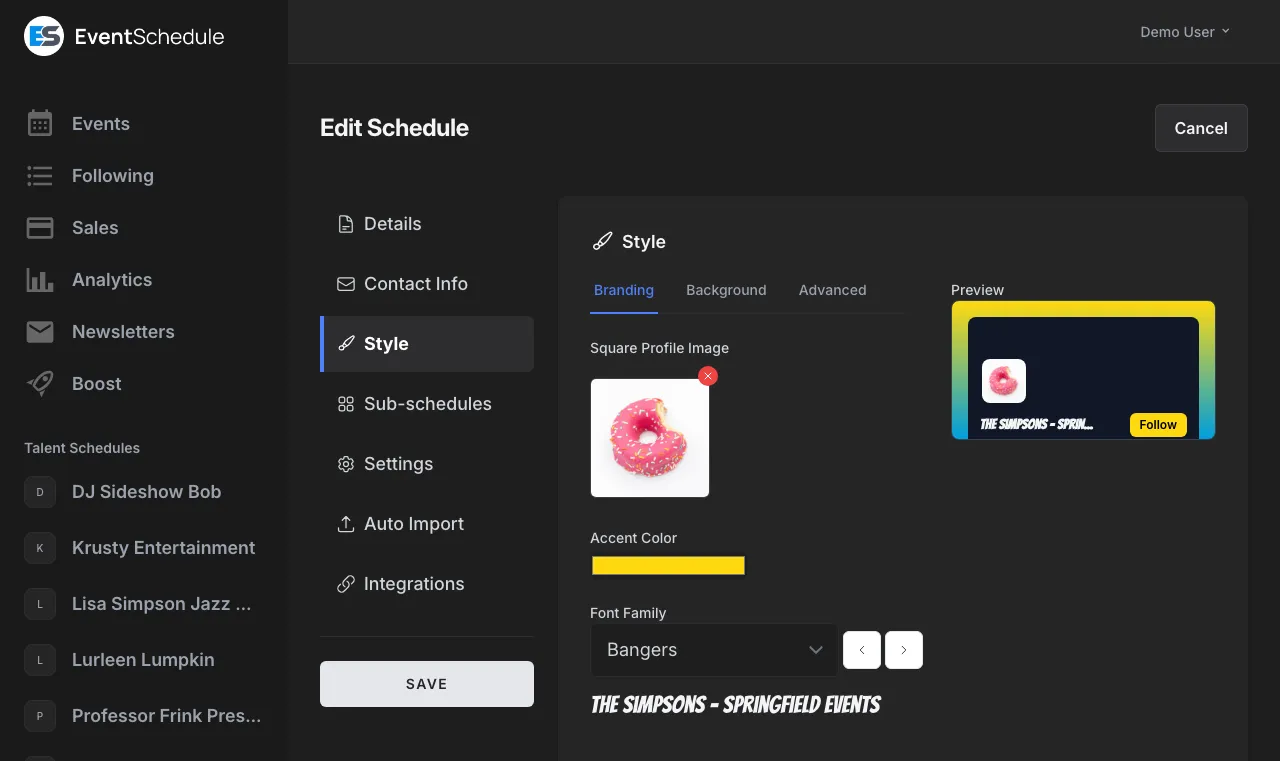
Your domain, your branding, your team, your server. Event Schedule is open source, so nothing here is locked behind us.
0 of 8 lit on your board

-
White label
ProRemove Event Schedule branding so the schedule your guests see is entirely yours.
A selfhosted install keeps one small credit line. -
Custom CSS
ProTake full control of your schedule styling with your own stylesheet.
-
Custom labels
ProRename the words your guests see so the schedule speaks your language.
-
Custom fields
ProAsk ticket buyers for dietary needs, t-shirt sizes or anything else you need to know.
Questions on a ticket type are on every plan. -
API and webhooks
ProA REST API plus webhooks, so Event Schedule fits into whatever you already built.
-
Custom domain
EnterprisePoint one DNS record at us and the certificate is issued automatically.
-
Private events
EnterpriseInternal events for the team, and Unlisted ones reachable only by link, with an optional password.
Public and Draft are on every plan. -
Team members
EnterpriseInvite people by email as admins or viewers and run the schedule together.
Open source under the Attribution Assurance License. Backup and restore takes out everything you have made, and brings it back. Read the source
And the small print, which is mostly good news
Thirty more things the app does, and the plan each one sits on.
- Ticket add-ons Pro
- Parking, merchandise or a workshop, each with its own stock
- Multi-event cart Free
- One checkout across several of your events, paid as a single amount
- Sales windows and group rates Free
- Open and close each ticket type on a date, and discount bigger orders
- PayPal checkout Pro
- Buyers pay into your own PayPal account, multi-event cart included
- Individual tickets Pro
- Every guest on an order gets their own email and their own QR code
- Refunds, full or partial Pro
- Money goes back through Stripe, PayPal or Razorpay, straight from the Sales page
- Interest list Free
- A "tell me when tickets go on sale" option that asks only for an email
- Add to Google Wallet Free
- Buyers save the ticket, QR and all, once the site operator switches it on
- Bulk attendee import Pro
- Up to 5,000 rows from a CSV, for a list you already hold
- Sales CSV export Pro
- Every sale across every schedule you own, custom fields included
- Sale notification emails Pro
- An email each time a ticket sells, with the buyer, the type and the amount
- Push notifications Pro
- Browser and mobile web push mirroring your email alerts
- Eventbrite import Pro
- Bring an existing run of events across in one go
- Import from a link Free
- Paste your events page or a calendar address and up to 100 events come across
- Feeds from other sites Enterprise
- A calendar, an RSS feed or an events page your schedule re-reads about once an hour
- Event templates Pro
- Save an event you repeat and start the next one from it
- Event cloning Free
- Duplicate any event as the starting point for the next one
- Agenda scanning Enterprise
- Photograph a running order and get the parts back as event parts
- WhatsApp event creation Enterprise
- Message or photograph an event and it lands on the schedule
- AI flyers and styles Enterprise
- A poster from the event details, or a whole look for your schedule, generated
- AI-written descriptions Enterprise
- A category and a description for an event, or a description for the schedule
- Scheduled graphic emails Enterprise
- Your events graphic emailed daily, weekly or monthly to the addresses you list
- Live calendar and RSS feeds Free
- Guests subscribe from Add to Calendar, and a moved date updates itself
- Schedule transfer Free
- Hand a schedule and its ticket revenue to another account
- Audit log Free
- When, who and what, for every event, member, sale and check-in on a schedule
- Pages for the acts you list Free
- Name an act or venue who is not here yet and they get a page to claim
- Event sources for curators Free
- Follow venue and act schedules and everything they publish lands on your guide
- Venue logo wall Free
- A header of the venues you play, or the acts you host, from your approved events
- Announcement banner Pro
- A banner of your own across the top of your schedule's public pages
- Nearby accommodation map Free
- Lodging near the venue on your event pages, once the site operator switches it on
Free also brings these, each further up this page: Calendar sync, Recurring events, Sub-schedules, Online events, AI import, Newsletters, 10 emails a month, Event graphics, Fan videos and photos, Analytics, Booking requests, Embed calendar, One appointment type, Ticket scanning at the door, Free registration, Email sign-up, Short links, The lineup.
Pro also brings these, each further up this page: Paid tickets, Passes, Gift cards, Paid appointments, Custom fields, Event polls, Post-event feedback, Boost, White label, Custom CSS, Custom labels, Embed tickets, Carpool, Check-in dashboard, API and webhooks, Invoice Ninja, 100 newsletter emails a month, Unlimited fan photos, Promo codes, Installments, Ticket waitlist, Photo gallery, Sponsor logos.
Enterprise also brings these, each further up this page: Custom domains, Team members, Internal and unlisted events, Availability, 1,000 newsletter emails a month, Reserved seating.
A selfhosted install has every row above. See the full plan comparison.
Common questions
Is Event Schedule really free?
Yes. Unlimited events, unlimited schedules, calendar sync, free registration with capacity limits, analytics and QR check-in at the door are all included on the free plan, with no time limit and no credit card required. Newsletters are metered rather than unlimited, at 10 emails a month with each recipient counting as one. A free schedule is also a team of one, with one free appointment type, and a price on a ticket or a booking is where Pro begins.
Do you take a cut of ticket sales?
No. Event Schedule charges zero platform fees on tickets, on every plan including free. You connect your own Stripe or PayPal account and payouts go straight to you, so the only deduction is what Stripe or PayPal charges to process the payment. Charging for a ticket is a Pro feature, but the fee is zero whatever you charge and whatever plan you are on.
Which payment methods can I accept?
Stripe and PayPal, each paying into your own account, plus Payfast for events priced in South African rand, Razorpay for events priced in Indian rupees (INR), an Invoice Ninja invoice, a payment link of your own, or cash. They come with Pro, because that is the plan that puts a price on a ticket, and you choose one per event. Installment plans, also on Pro, run on Stripe only.
Can I refund a ticket?
Yes, on Pro. From the Sales page, a Stripe, PayPal or Razorpay sale can be refunded in full or in part, and the status only changes once the money has gone back through the provider. A partial refund keeps the tickets valid; a full one puts them back on sale. An installment plan is refunded in full, one payment at a time. Any other method, such as cash, a payment link, Payfast or Invoice Ninja, shows Mark as Refunded instead, which records the refund without moving money.
Can visitors ask to be told when tickets go on sale?
Yes, on every plan. Switch on the "Notify me" card and, from Add to Calendar on the event page, a visitor leaves just an email address, with no account, and gets one email when tickets go on sale, one if it is cancelled, a reminder shortly before it starts, and any notice you choose to send if the date or venue changes. Each date of a recurring event is separate, every email has a one-click unsubscribe, and the list does not count against your newsletter allowance. You can see how many people are waiting on the Tickets panel of the event editor.
Can buyers choose their own seat?
Yes, on the Enterprise plan. Draw your room once on a venue schedule as a reusable seating plan - levels, sections, rows, tables, standing areas and wheelchair spaces - attach it to an event, and buyers pick their seats off the map. One plan covers every date of a run, and a single date can be changed on its own. Your box office gets the same map to hold seats back, take a booking over the phone, move somebody or release one seat.
Can I use my own domain?
Yes. Custom domains are available on the Enterprise plan. You add one CNAME record at your registrar, and the SSL certificate is issued automatically once it resolves.
Can I run it on my own server?
Yes. Event Schedule is open source under the Attribution Assurance License. Selfhosted installs include every Enterprise feature at no cost, and the app updates itself with one click from the admin panel.
Do I need a credit card to start?
No. You can create a schedule and start publishing events without entering any payment details. You only add a card if you choose to upgrade to Pro or Enterprise.
Keep exploring
Pricing
See what is included on Free, Pro, and Enterprise plans.
Read moreSelfhost
Run every Enterprise feature on your own server at no cost.
Read moreCompare Alternatives
See how Event Schedule stacks up against other platforms.
Read moreExamples
Real schedules built by venues, artists, and organizers.
Read moreReady to get started?
Create your free event schedule in seconds. No credit card required.
The board at the top of this page is lit for the Free plan, and that is where everyone starts. keys are lit on your board, which makes it a Pro board. You start on Free and move up when you need to. keys are lit on your board, which makes it an Enterprise board. You start on Free and move up when you need to.